For group therapy practices

You do the therapy. We handle everything else.

We set it up, we run it, and we do your billing. When you need help, a real person answers.

Made for practices with 3 to 20 clinicians. Starting in California.

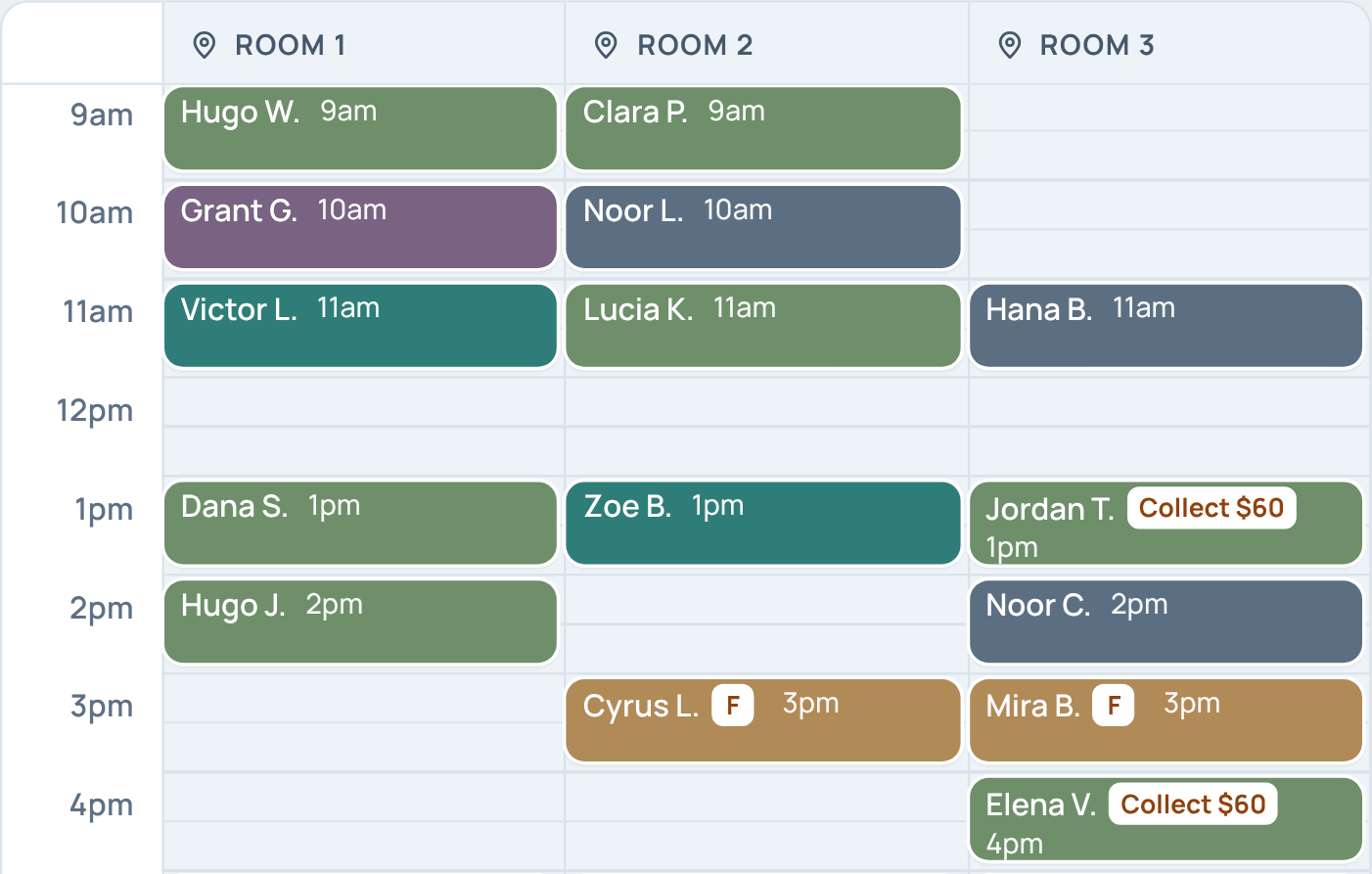
The Calendar: one day, every clinician, with the copay on the session.

Our four promises

  • Your notes and claims in one placeA signed note builds its own claim. No second system.
  • Moving over is on usWe bring your clients, notes and balances.
  • One simple priceSimple pricing. No add-ons. We go over it in the demo.
  • We do your billingWe prepare every claim. You approve with one click. We chase the exceptions.

What it does

Built for how group practices work

Many clinicians, shared rooms, associates who need a supervisor, and insurance on most visits. Every picture is a real screen from our software, showing a made-up practice.

01 Calendar & copays

The whole day in one view, with the copay on the session.

Every clinician and every room on one screen. Clinicians see and collect only their own clients' copay.

  • A calendar with rooms and online booking of your services, with text and email reminders.
  • Copays at the visit. Card or cash, straight from the session.
  • A client portal for intake forms and e-signed consents. English, with a Spanish toggle for clients.
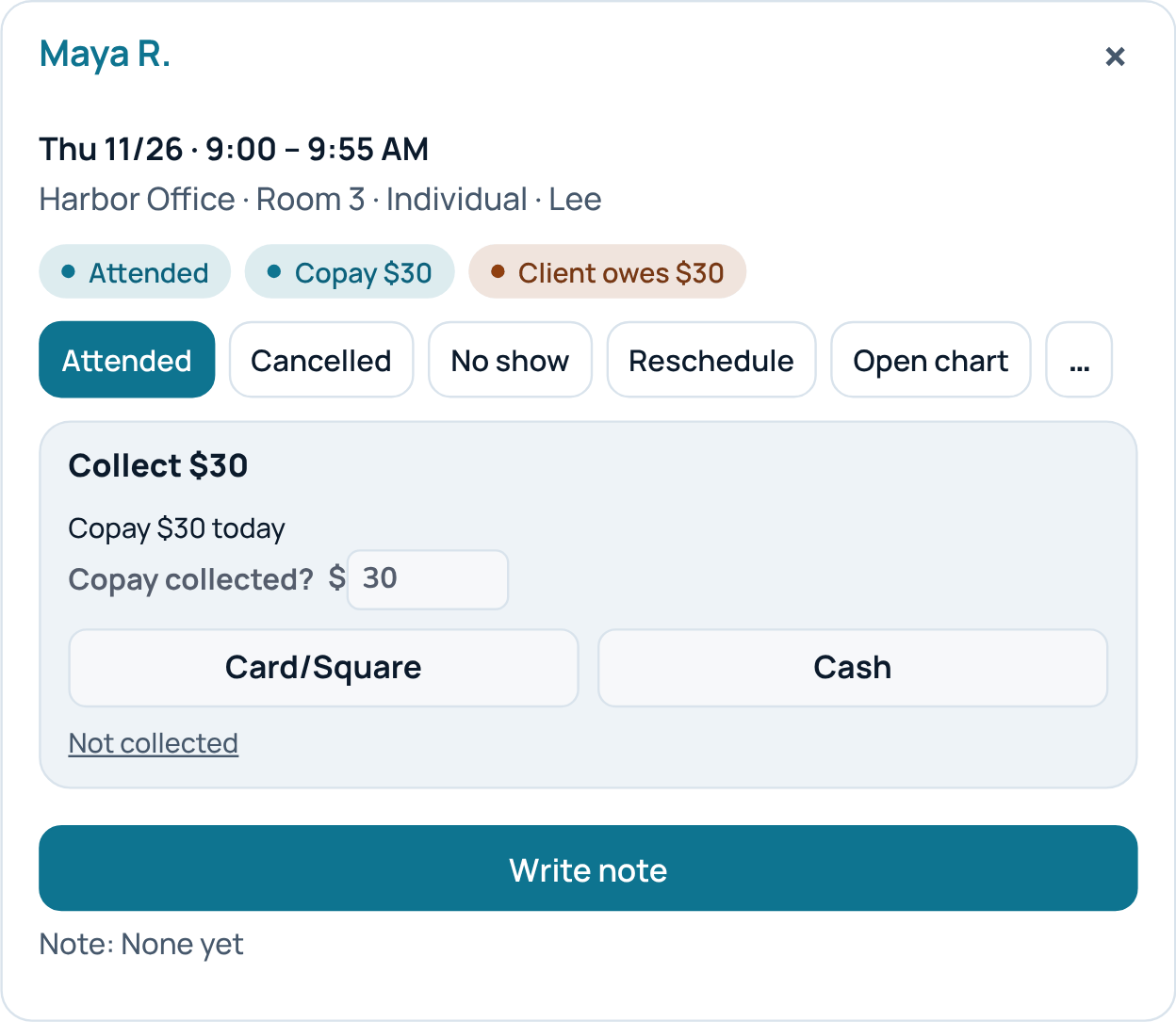
A session opened from the Calendar by its clinician: marked Attended, with a Copay $30 chip, Collect $30, and buttons to take it by card or cash, then Write note.
A clinician opens a session on the Calendar and collects the copay. Tap to enlarge

02 Notes, supervision & deadlines

A clear note, signed on time, co-signed without chasing paper.

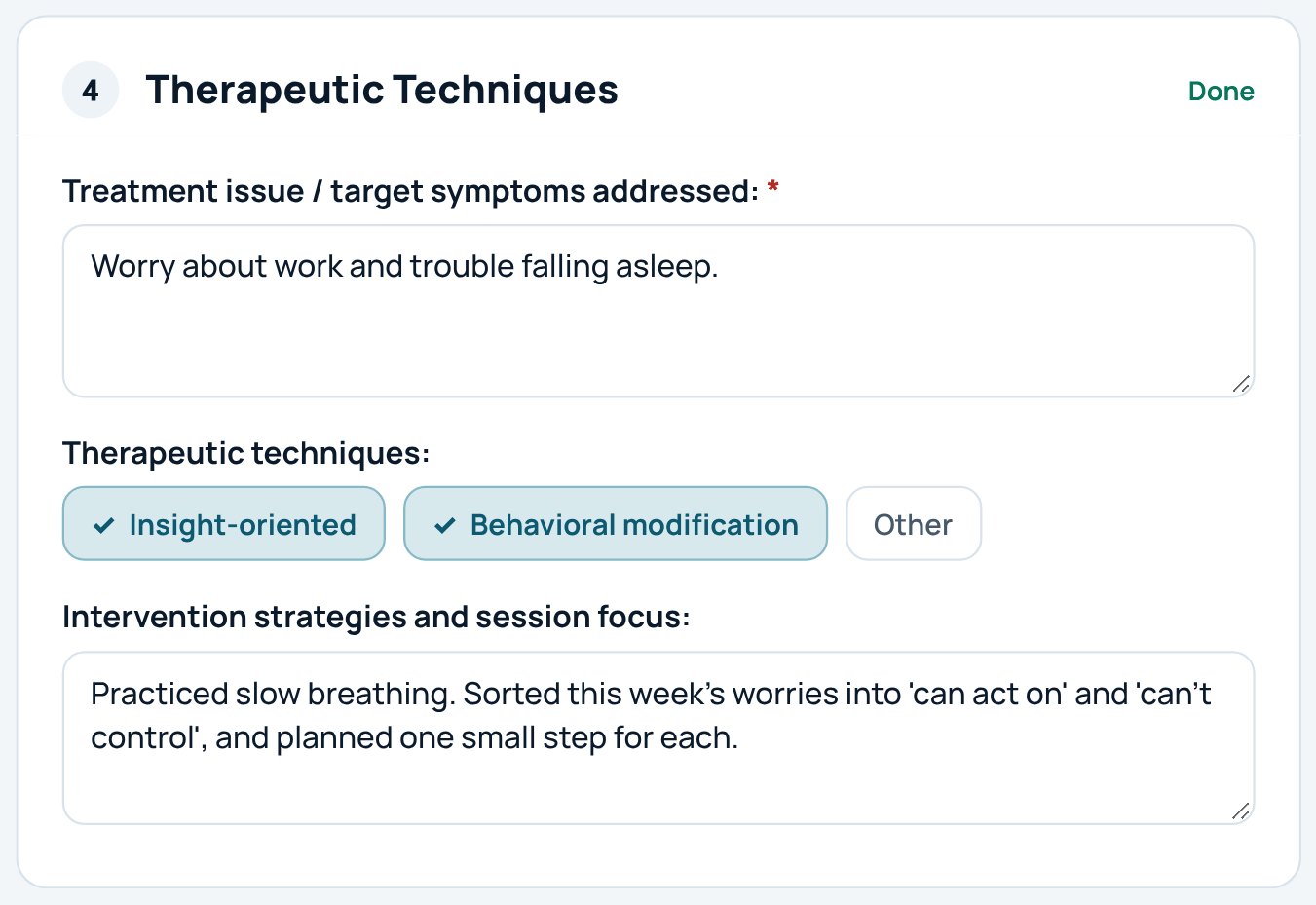
Open the note right from the session. Tap what happened, write the rest in your own words.

  • Notes on time. The practice picks "notes within X days", with a reminder or a lockout.
  • Associates and supervision. A co-sign queue for supervisors and a supervision-hours log for California associates.
  • Video sessions run inside the software.
A progress note being filled in: the treatment issue typed in, two therapeutic techniques picked as chips, and the session focus written in the clinician's own words.
The top of a progress note, being filled in. Tap to enlarge

03 Claims & denials

Claims ready in one click. Denials in plain words.

We prepare every claim. You approve with one click. We chase the exceptions. You don't change how you bill. We set it up from your last year.

  • Claims built when the note is signed. They wait for you on To-Do, ready to approve.
  • Insurance done for groups, including Medi-Cal and Kaiser/Lucet referrals. You choose the clearinghouse.
  • Payments posted from the insurer's files. A rejected claim becomes a To-Do with the fix in plain words.
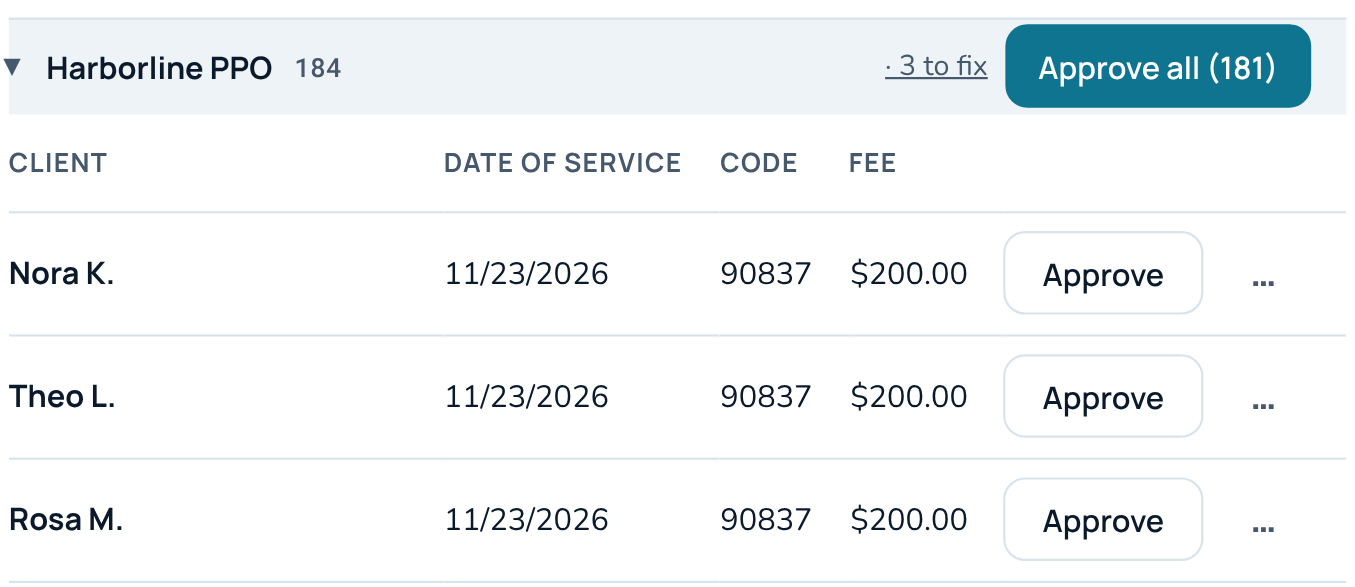
An owner's To-Do: claims to check and send for one insurer, three shown, each with an Approve button, and Approve all for the group.
An owner's To-Do: claims to approve, one click each. Tap to enlarge
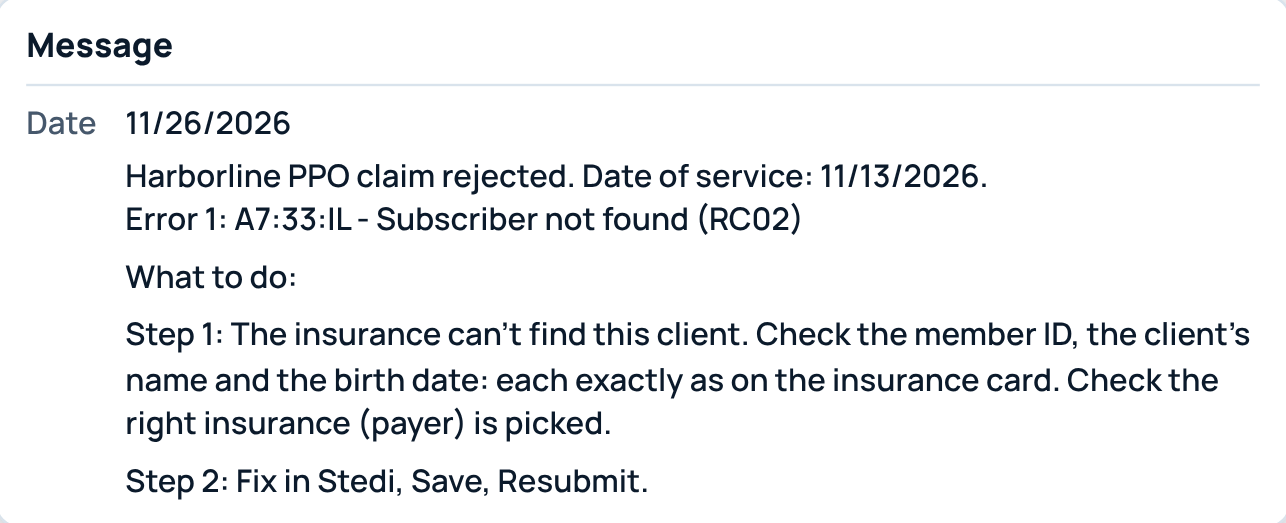
A rejected claim explained: the error, Subscriber not found, and what to do in plain words. Step 1: the insurance can't find this client, so check the member ID, the client's name and the birth date exactly as on the insurance card. Step 2: fix and resubmit.
A rejected claim, explained in plain words with the fix. Tap to enlarge

The two-way lock

Clinicians never see money. Billing staff never see therapy notes.

  • Roles you can read. The Roles page shows who sees what, in plain words.
  • Clinicians don't see money, except their own clients' copay. Only owners change roles.
  • Every role change is logged and sent to the owners.
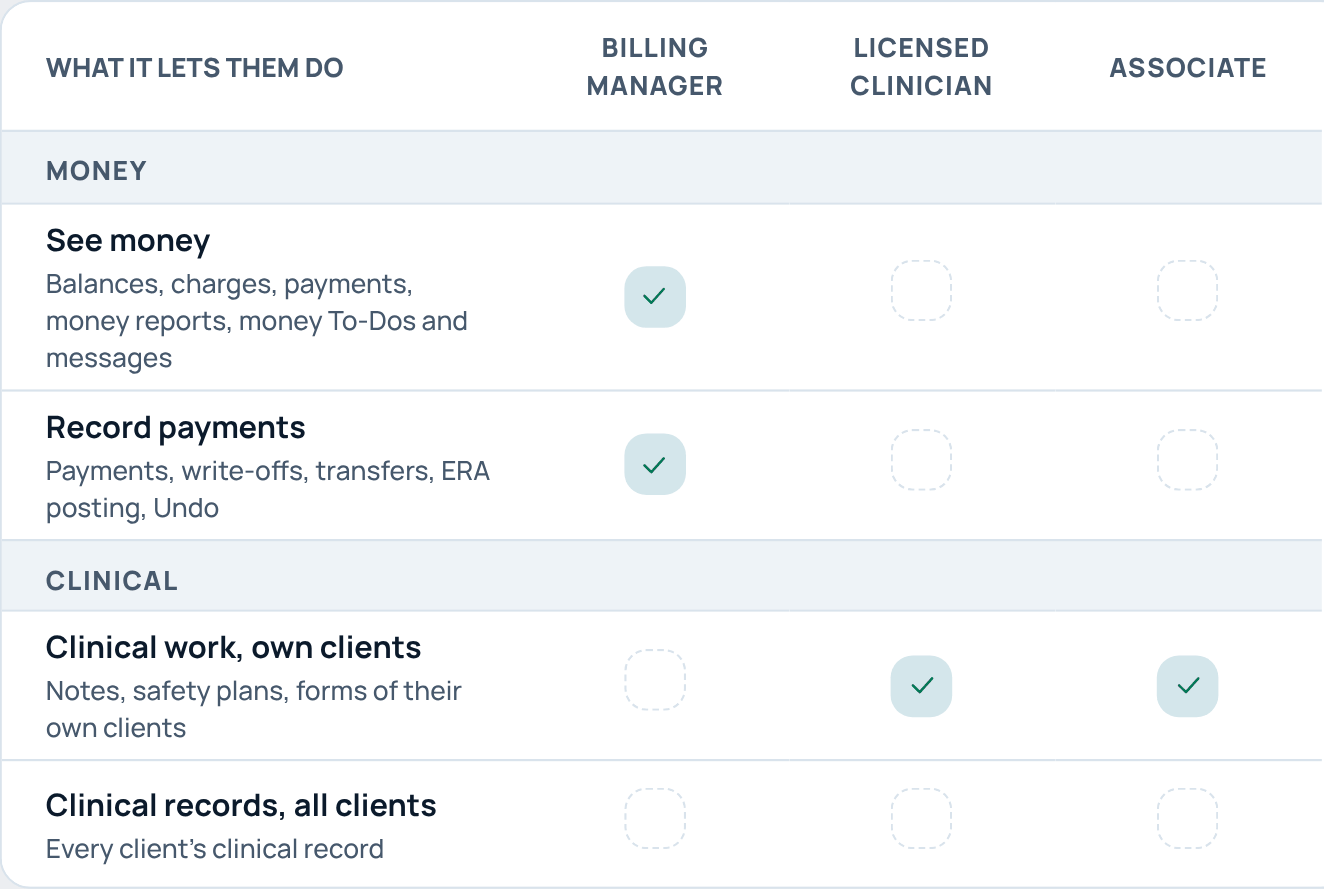
The Roles page, cropped to four rows. The billing manager can see money and record payments but has no clinical access. The licensed clinician and the associate do clinical work for their own clients and don't see money.
The Roles page: who sees money and who sees notes. Tap to enlarge
  • Clinicians Therapy notes No money, except their own clients' copay
  • Owners & billing Money & claims Billing staff never open a therapy note

Moving over

Three steps. We do the heavy lifting.

  1. Book a demo

    We show you the software and answer your questions. You see if it fits your practice.

  2. We move you in

    We move your records in and set up your practice: your team, rooms, services and insurance, based on your last year of billing.

  3. Your team signs in

    Everyone signs in and gets to work. When you have a question, a real person answers.

Handled, and still yours

  • You keep your own insurance contracts.
  • You keep your own data.
  • You can leave any time, with a full export.

That's unlike networks that take a cut of every session.

Privacy and security

Built for HIPAA, with your clients' privacy in mind

  • We sign a BAAWe sign a Business Associate Agreement with your practice.
  • Your data is encryptedRecords are encrypted while they move and while they are stored.
  • Your own databaseEach practice's records are kept apart, in their own database.
  • Daily backupsWe back up every practice every day.

AI is off until you turn it on. It only runs through Amazon Bedrock under our BAA, and it is never used for training. Read the details in our Privacy Policy.

FAQ

Questions owners ask us

Something else on your mind? Email us and a person writes back.

How do we move from our current EMR?

We do the move for you. We bring your records in and set up your team, rooms, services and insurance. We set up billing from your last year, so you don't change how you bill.

Do you really do our billing?

Yes. We prepare every claim. You approve with one click. We chase the exceptions: denials, rejections and claims that need fixing. You keep your own insurance contracts, and the money is paid to your practice.

Which clearinghouses do you work with?

Office Ally today. Claim.MD and Stedi are options. Each clearinghouse works under its own BAA, and we set up the connection for you.

Who owns our data?

Your practice does. We use your records only to run the service, as our agreement and BAA allow. You can export everything at any time.

Do you use AI? Is it private?

AI is off until you turn it on. It only runs through Amazon Bedrock under our BAA, and your data is never used to train models. If you use it for notes, it only runs for clients who consent, and the clinician reads, fixes and signs every note.

What kind of contract do we sign?

A simple monthly agreement plus a BAA. No long lock-in.

What happens if we leave?

You export everything with one button. After you leave, we keep a read-only copy for 60 days, then delete it and give you a certificate of deletion.

You do the therapy. We handle everything else.

See it with your own schedule in mind, or start with a free billing checkup.

Free billing checkup: we'll show you your denial rate and what you're owed.